Equipment:
'88 Vintage Fire Magic gasser with over 4000 cooks to its credit
Large Big Green Egg
18 Inch Weber Kettle (Rescued from neighbor's trash)
Rotisserie for 18 inch kettle
Dyna Glo propane smoker
Pit Barrel Cooker
Smokey Joe with mini WSM mod
Garcima paella burner
Anova Sous Vide
Slaiya Sous Vide (gift)
LEM grinder, sausage stuffer and meat slicer (all gifts)
There is forum software out there somewhere that automatically reduces the size of pictures that are unnecessarily large for viewing. There are occasions when pictures >4000 pixels wide are included in posts. There is no need for that many pixels, and even at reasonable internet speeds, these take a long time to download. I recommend that the Pit's IT folks look into software that automatically reduces picture size, or limit the size of pictures that are allowed to something reasonable for screen viewing.
While waiting for the Pit's IT folks to incorporate a resizer, large photos also tend to cause problems with uploading...
For now, we can help the situation by resizing our photos before we send them off the the Pit servers.
Here was my advice from a previous post:
At one time, Microsoft had an add on package called PowerToys that had a nice image resizer. It is now maintained by another person:
Future versions of Image Resizer for Windows will be available as part of the Microsoft PowerToys.
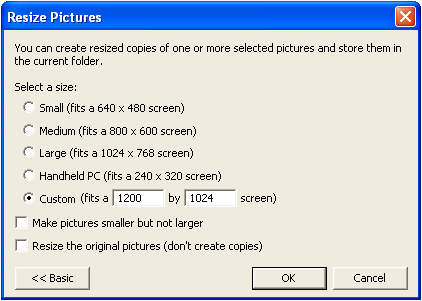
Once you install it, you can right click on any photo and one of the options is "Resize pictures". I always do this when I upload to AR. I select "Large (fits within 192 X 1080)". I just did this to post a picture in another thread. The original photo was 4.38MB and was resized to 684KB!!!
When viewing on a web page you could never tell the difference between the two.
Equipment:
'88 Vintage Fire Magic gasser with over 4000 cooks to its credit
Large Big Green Egg
18 Inch Weber Kettle (Rescued from neighbor's trash)
Rotisserie for 18 inch kettle
Dyna Glo propane smoker
Pit Barrel Cooker
Smokey Joe with mini WSM mod
Garcima paella burner
Anova Sous Vide
Slaiya Sous Vide (gift)
LEM grinder, sausage stuffer and meat slicer (all gifts)
JGrana Agree with you 100%. I generally reduce and crop photos to something between 600 and 1000 pixels wide prior to uploading with Photoshop. These display full frame width in The Pit's software. Microsoft still ships "Paint" with Windows, and "Microsoft Photo Editor" ships with Windows or Office. Both have resize and crop features. In addition to uploading and downloading challenges with large files, somebody (our Pit membership$) is paying for the server space.
While waiting for the Pit's IT folks to incorporate a resizer, large photos also tend to cause problems with uploading...
For now, we can help the situation by resizing our photos before we send them off the the Pit servers.
Here was my advice from a previous post:
At one time, Microsoft had an add on package called PowerToys that had a nice image resizer. It is now maintained by another person:
Future versions of Image Resizer for Windows will be available as part of the Microsoft PowerToys.
Once you install it, you can right click on any photo and one of the options is "Resize pictures". I always do this when I upload to AR. I select "Large (fits within 192 X 1080)". I just did this to post a picture in another thread. The original photo was 4.38MB and was resized to 684KB!!!
When viewing on a web page you could never tell the difference between the two.
That should be 1920 x 1080 not 192 x 1080.
I wrote a whole series of articles a few years ago for another web site (autogeek.net), talking about the technology and how it's out of control on the image side, but not out of control on the audio side. The articles need updating because of the 1536x1024 and 2048 x 1536 being used on some tablets and phones, but it gets the idea across. I'll find it and publish it here, although I don't have time to update it at the moment. I'll close with a disclaimer about the latest technology, and get it updated as soon as I can.
Thanks, you are correct - dropped the 0!!! Frankly, for images on websites like AR, even 1920 X 1080 is on the high side for typical use cases like showing your grill, food, etc. Doubt many people download and print an 8X10 or 11X14 of the pics ;-)




Comment